

On this page
Maintain entities and promote configuration
Inspect, test, save, duplicate, rename, export, import, and safely remove reusable Trazadera Golden configuration resources.
Resources are named configuration objects reused by entities and data flows.
Resource inspection and lifecycle operations require ADMIN. Golden provides
one lifecycle API across all supported resource types, plus
operations for property defaults and allowed values.
Supported resource families
The web application groups resources by their function in Golden, and uses the same six families in its navigation:
| Family | Resource type values |
|---|---|
| Model and present | dataset, data-view |
| Bring data in | source-file, source-jdbc, source-table |
| Prepare and transform | transformation, pipeline |
| Resolve duplicates | indexer, classifier-weight, merger-weight, steward-bucket |
| Publish results | sink-http, sink-jdbc, sink-kafka, sink-table |
| Protect connections | credentials |
Each resource uses _id as its canonical identifier and type as its resource
type. Avoid placing secret values in resources other than the approved
credentials type.
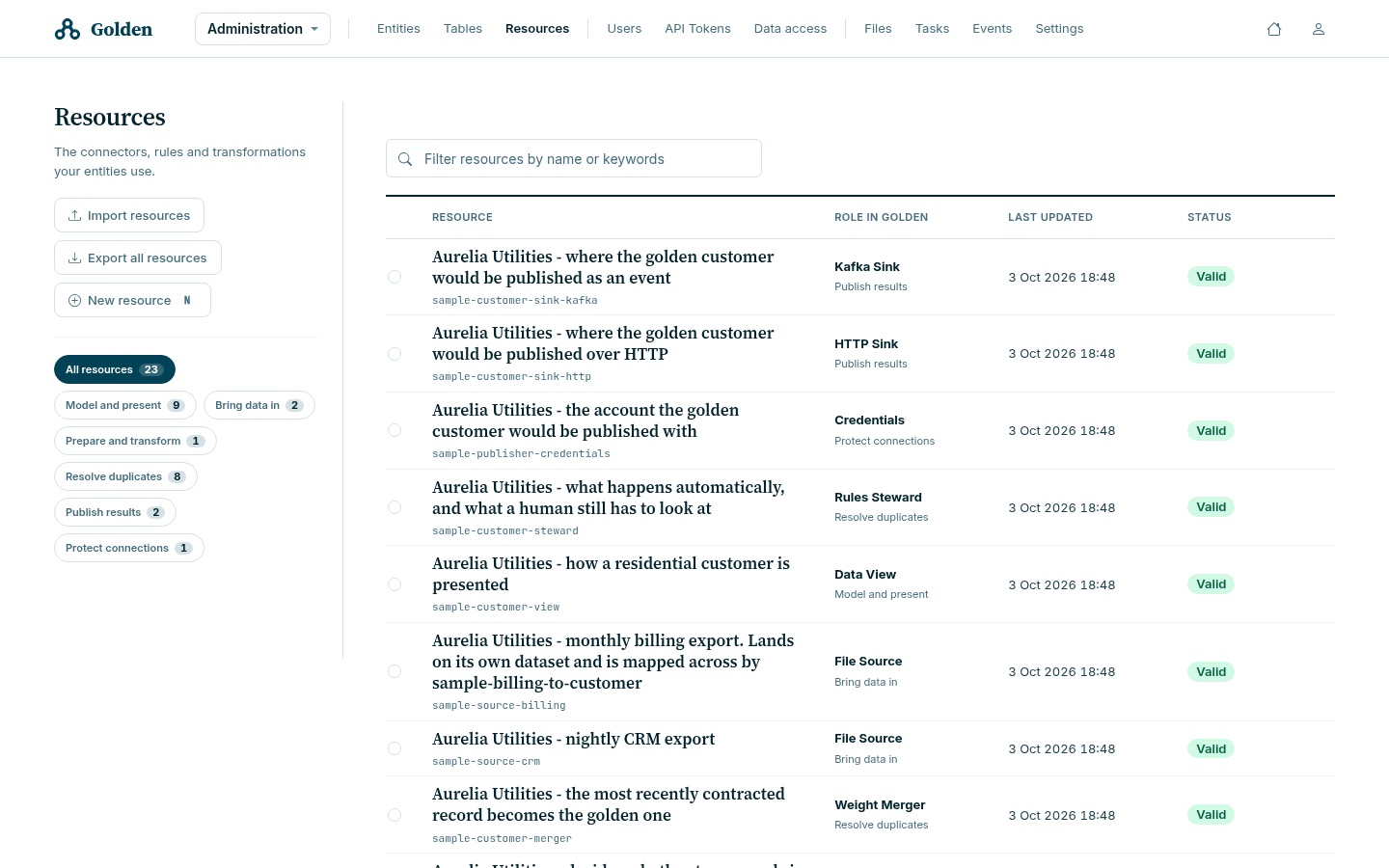
The summary above the list counts resources, functional families, how many
need attention, and how many are locked. A resource showing Valid
has passed validation; it does not mean anything uses it.
Use description to explain the resource’s purpose. For example, describe
which date determines merge precedence rather than repeating the resource type.
Inspect resources and schemas
curl -sS "$GOLDEN_URL/api/resources" \
  -H "Authorization: Bearer $GOLDEN_ADMIN_TOKEN"

curl -sS "$GOLDEN_URL/api/resources/id/sample-customer" \
  -H "Authorization: Bearer $GOLDEN_ADMIN_TOKEN"

curl -sS "$GOLDEN_URL/api/resources/describe/dataset" \
  -H "Authorization: Bearer $GOLDEN_ADMIN_TOKEN"

curl -sS "$GOLDEN_URL/api/resources/enums" \
  -H "Authorization: Bearer $GOLDEN_ADMIN_TOKEN"
GET /api/resources/describe/{type} returns an empty resource with its default
values. Use it to learn property names and defaults. It does not return a JSON
schema or enumerate constraints.
Use GET /api/resources/enums for roles, reference choices, and the identifiers of
configured datasets, tables, entities, sources, destinations, indexers,
transformations, pipelines, classifiers, mergers, and stewards.
Read lifecycle state
Resource responses can include:
| Field | Meaning |
|---|---|
lastUpdated | Last reported update time |
validation | Customer-visible validation state |
dependency | Objects that depend on the resource |
locked | Whether modification is currently blocked |
lockCount | Number of active locks; the resource is unlocked only at zero |
Use dependency to identify references that prevent deletion. A 423 response
means the resource is disabled or locked; inspect its state before retrying.
Test and save
The resource field in the API request is a JSON-encoded string, not a nested
object. Given a resource definition in customer-dataset.json, jq can build
the wrapper without hand-escaping it:
jq --raw-input --slurp \
  '{resource: ., create: true, test: true}' \
  customer-dataset.json |
curl -sS -X POST "$GOLDEN_URL/api/resources" \
  -H "Authorization: Bearer $GOLDEN_ADMIN_TOKEN" \
  -H "Content-Type: application/json" \
  --data-binary @-
Set test to false only after validation succeeds. Use create: true for a
new identifier and create: false to update an existing resource. Saving
resources requires ADMIN.
Choose resource test data
When test is true, testOptions selects the records used to exercise the
resource:
| Type | Test input |
|---|---|
AUTOMATIC | A product-selected mix appropriate to the resource |
DATASET | Records shaped by the selected dataset |
SOURCE | Real records read from the selected external source |
TABLE | Records already held in the selected Golden table |
SYNTHETIC | Generated records |
CUSTOM | The supplied JSON interpreted with customDataset |
testOptions is a JSON-encoded string. For example, to test a resource against
records already stored in a table:
jq --rawfile resource customer-dataset.json -n \
  '{resource:$resource,create:true,test:true,
    testOptions:({type:"TABLE",table:"customers"}|tojson)}' |
curl --fail-with-body --silent --show-error \
  -X POST "$GOLDEN_URL/api/resources" \
  -H "Authorization: Bearer $GOLDEN_ADMIN_TOKEN" \
  -H "Content-Type: application/json" --data-binary @-
Choose an existing table compatible with the resource’s dataset.
TABLE is usually the safest realistic input because the records are already
in Golden and in the expected shape. SOURCE reads the external system, so test duration depends on that system
and the selected data. HTTP, JDBC and Kafka destination tests inspect connectivity and preview
payloads without delivering those test records. They can still contact the
configured system. A successful test does not prove a real delivery succeeded;
verify a controlled export separately.
Duplicate, rename, and delete
curl -sS -X PUT "$GOLDEN_URL/api/resources/duplicate/customer_dataset/customer_dataset_v2" \
  -H "Authorization: Bearer $GOLDEN_ADMIN_TOKEN"

curl -sS -X PUT "$GOLDEN_URL/api/resources/rename/customer_dataset_v2/customer_dataset_next" \
  -H "Authorization: Bearer $GOLDEN_ADMIN_TOKEN"

curl -sS -X DELETE "$GOLDEN_URL/api/resources/id/customer_dataset_next" \
  -H "Authorization: Bearer $GOLDEN_ADMIN_TOKEN"
References in other resources or entities are identifier-based. Review and validate dependents before renaming or deleting a resource; do not assume the operation rewrites those references.
Export and import
Export selected identifiers with the id array, or use the supported all
option for a complete package:
curl -sS -X POST "$GOLDEN_URL/api/resources/export" \
  -H "Authorization: Bearer $GOLDEN_ADMIN_TOKEN" \
  -H "Content-Type: application/json" \
  -d '{"id":["customer_dataset","customer_indexer"],"all":false}' \
  -o golden-resources.json
Import wraps the exported exchange object:
jq '{exchange: .exchange}' golden-resources.json |
curl -sS -X POST "$GOLDEN_URL/api/resources/import" \
  -H "Authorization: Bearer $GOLDEN_ADMIN_TOKEN" \
  -H "Content-Type: application/json" \
  --data-binary @-
Move a complete dependency set and test it against controlled data in the target environment before enabling associated flows.
Promote entities and tables
Administrators can exchange entity and table configuration through REST:
| Method | Path | Purpose |
|---|---|---|
POST | /api/entities/export | Export the entity identifiers in ids |
GET | /api/entities/export/all | Export all entities |
POST | /api/entities/import | Import a previously exported exchange |
POST | /api/tables/extract | Export the table identifiers in ids |
GET | /api/tables/extract/all | Export all table definitions |
POST | /api/tables/ingest | Import a previously exported exchange |
Use the REST operations directly and preserve the returned exchange object.
Export resources first, then tables and entities in dependency order. Validate
the imported configuration before enabling work; exchange does not replace
environment-specific credentials or endpoint review.