

On this page
Read quality in Aurelia
Use the existing sample quality example to connect reported scores with findings and record conditions.
Investigate a quality warning, calculate its effect, and test a correction without changing Aurelia. This keeps the later duplicate exercises reproducible.
Before you begin
Complete Install Aurelia and Follow its data.
Use the initial sample, before edits or duplicate decisions. For these API
steps, set GOLDEN_URL and GOLDEN_TOKEN as in the
API quickstart. Use an ADMIN or STEWARD
credential with access to the sample and install curl and jq.
Read the installation measurement
Open Quality for Aurelia. The initial picture includes all 378 records, with an average score of 88.25. Picture shown identifies its date and time. Use Change to choose the installation measurement if a later one is currently displayed, then confirm with Show this picture.
View the complete installation picture.
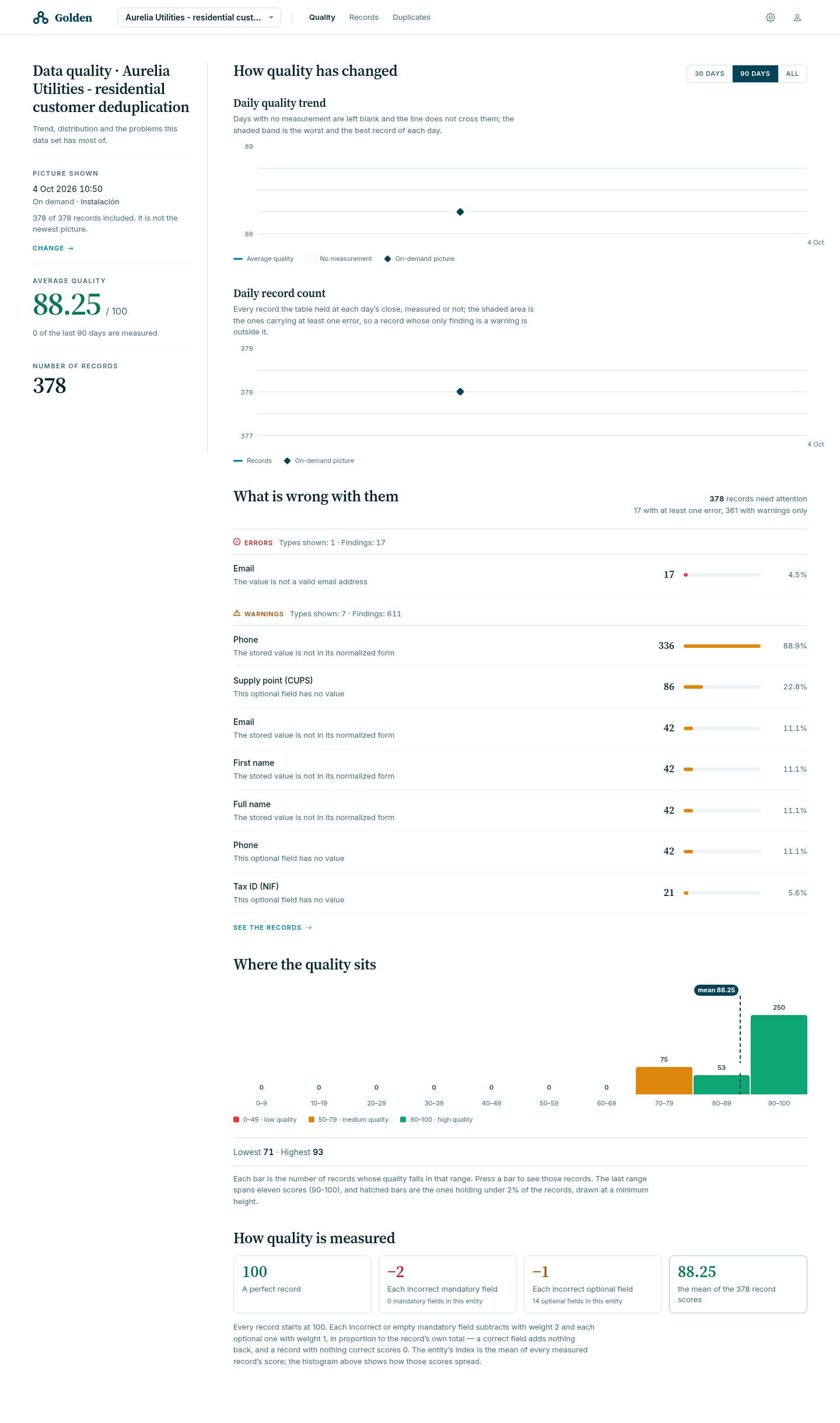
The error list counts 17 invalid email findings. The most frequent warning is an unnormalized phone, with 336 findings. These are counts for the whole table; the steps below investigate one record.
Read Ana’s stored measurement
curl --fail-with-body --silent --show-error \
  -H "Authorization: Bearer $GOLDEN_TOKEN" \
  "$GOLDEN_URL/api/tables/sample_customer/records/CRM-0001/quality"
Expect score: 93, availablePoints: 14, errorCount: 0, and
warningCount: 1. The finding concerns phone; its message explains that the
stored value is not normalized. The response also distinguishes storedScore
and storedState from the measurement it computes now.
Thirteen of the fourteen available points are earned:
100 × 13 / 14 rounds to 93. Read the contributions list to identify
which field loses its point. A score alone cannot identify that field.
Check a corrected draft
Fetch the record, keep the business fields, and replace the phone in a local file. This request sequence saves no record in Golden.
curl --fail-with-body --silent --show-error \
  -H "Authorization: Bearer $GOLDEN_TOKEN" \
  "$GOLDEN_URL/api/tables/sample_customer/records/CRM-0001" |
jq '{record: (.record | with_entries(select((.key | startswith("_")) | not))
  | del(.qualityState, .id) | .phone = "+34611000000")}' \
  > aurelia-quality-draft.json

curl --fail-with-body --silent --show-error \
  -H "Authorization: Bearer $GOLDEN_TOKEN" \
  -H "Content-Type: application/json" \
  --data-binary @aurelia-quality-draft.json \
  "$GOLDEN_URL/api/tables/sample_customer/records/check"
The draft measures 100, with zero errors, zero warnings, and an empty
findings list. The check evaluates the submitted values; it does not run a
cleaner, write a record, or create a table quality measurement.
Verify that the sample is unchanged
Read CRM-0001 again. Its stored phone remains 611000000 and its stored
quality score remains 93. The draft’s 100 was a preview of a correction,
not a saved result.
For a lasting correction, change the authoritative source or the configured processing and verify the resulting write. The configuration guide explains that workflow.
Clean up and continue
Delete the local draft when finished:
rm aurelia-quality-draft.json
No reinstall is needed because this exercise changed no sample records. Continue with Search the sample.