

On this page
Lens in five minutes
Understand Lens, its Mobility solution, and the optional modules that add business context.
Trazadera Lens collects data through centrally managed programs running on agents. You choose what to run, configure its inputs, assign it to devices, and use the resulting measurements. The Mobility solution applies those capabilities to WiFi analysis.
This guide is for architects and consultants preparing a deployment or interpreting its results. Start by separating the platform, the solution, and its optional modules.
Platform, solutions, and optional modules
| Layer | What it provides | Example |
|---|---|---|
| Lens Platform | Shared collection and administration: agents, programs, configurations, deployments, and metrics | Assign a configured measurement program to a group of Android devices |
| Mobility — WiFi | WiFi collection and analysis, including the spatial model used to place observations | Investigate connectivity across a hotel’s buildings, floors, floor plans, and areas |
| Optional modules | Additional business context for Mobility | Compare WiFi observations with hotel occupancy or guest ratings |
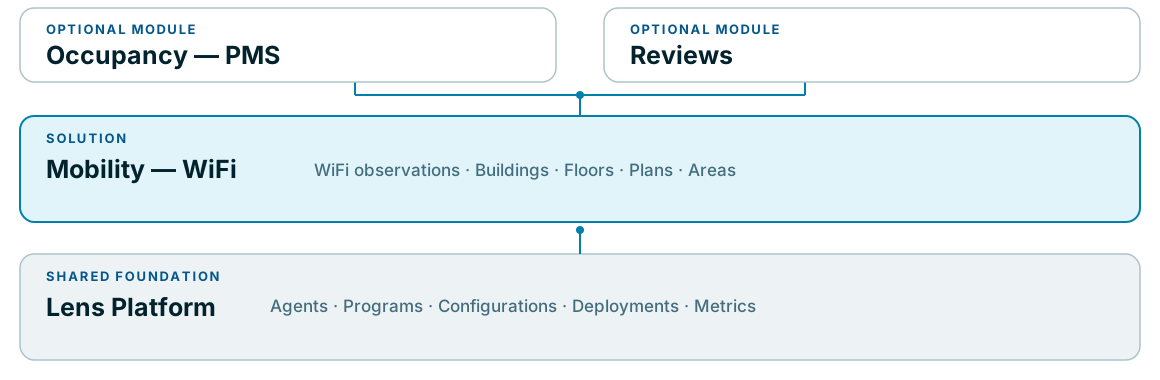
Buildings, floors, floor plans, and areas belong to Mobility. They are not prerequisites for understanding the shared collection platform. Occupancy and reviews extend the Mobility experience; both are currently in development.
From a device to an observation
An agent runs on a device. A program defines the work it performs and the measurements it produces. A configuration supplies the program’s options. A deployment brings these together, selecting agents through tags and setting an execution schedule. The resulting metrics are the observations you can inspect.
Managing an agent and interpreting a WiFi result are different tasks. A recent agent heartbeat indicates communication with Lens; it does not by itself demonstrate that a measurement program completed or that a hotel’s WiFi is satisfactory.
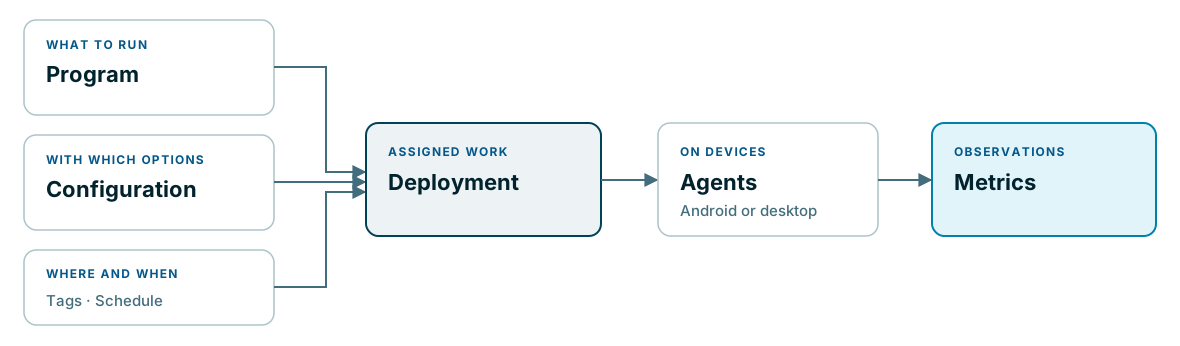
Read Fundamental concepts for these relationships and the checks that distinguish them.
Follow a hotel example
Consider a fictional hotel collecting WiFi measurements with Android devices. The platform supplies the agents and their program deployments. Mobility adds the hotel context: its buildings and floors, the floor plans and areas, and the WiFi infrastructure being observed.
An operator investigates an area with poor measurements. First, they check that the devices actually reported observations in the selected period. Then they examine the WiFi evidence in Mobility. A hotel occupancy figure would add demand context, while guest reviews would add reported experience. Neither would replace measurements, locate individual guests, or prove the cause of a WiFi problem.
This is an illustrative scenario, not a measured result from an installation.
What you work with
The web application provides shared administration and the analysis pages available to your installation. Android and desktop agents run collection programs. The program and device determine which observations are possible; installing an agent alone does not supply every solution’s measurements.
Choose your next task
| Goal | Start here |
|---|---|
| Understand how collection is organized | Fundamental concepts |
| Understand the WiFi solution and its analysis views | Mobility — WiFi |
| Plan the representation of a site | Spatial model |
| Assess the role of PMS data and guest feedback | Optional modules |