

On this page
Lens platform concepts
Understand how agents, programs, configurations, deployments, and metrics relate.
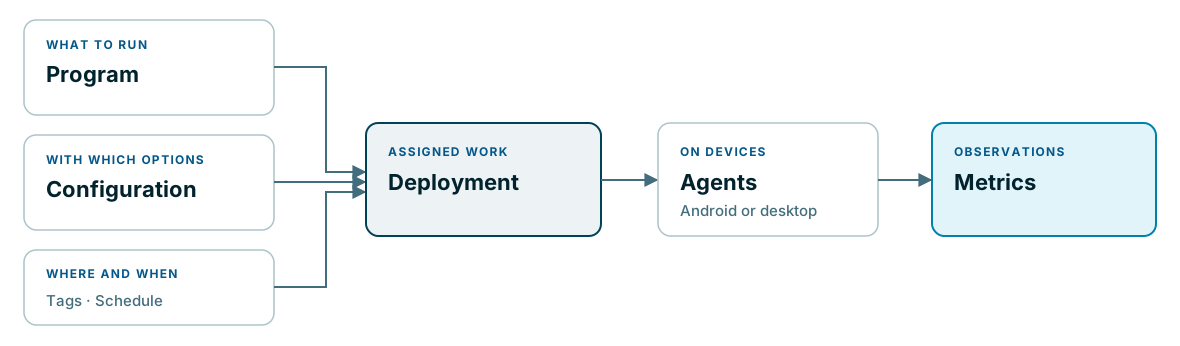
Lens separates the device that performs work from the work assigned to it. This lets you manage collection across multiple devices while keeping program options and deployment targeting explicit.
The collection model
| Concept | Meaning | Question it answers |
|---|---|---|
| Agent | A registered runtime on an Android or desktop device | Which device executes the work? |
| Program | The executable collection work and its declared output | What will the agent do and report? |
| Configuration | A named set of program options | With which inputs and settings? |
| Deployment | A program, a configuration, target tags, an execution schedule, and a timeout | Where and when should this work run? |
| Metric | An observation produced by a program | What was measured? |
A device is not a program, and a configuration does not select devices. The deployment connects those choices. Before changing a reusable program or configuration, identify the deployments that use it and the agents they target.
Tags and deployment scope
Deployments select agents using tags. Treat tag assignment as part of deployment planning: a tag change can affect which work a device receives. Use names that express an operational purpose rather than relying on a person’s memory of a device name.
For example, a fictional pilot may use a dedicated tag for its test devices. Confirm the actual agent selection before extending the same deployment to a wider population. This example does not prescribe a tag naming convention or tag-matching rule.
Three different checks
A collection setup has several independently verifiable stages:
- Agent communication: the device has contacted Lens recently.
- Assigned work: the intended program and configuration are associated with the agent through a deployment.
- Measurement delivery: the expected observations exist for that device and time period.
Passing the first check does not establish the third. A device may communicate while the program has no usable observations, lacks access to a required device capability, or is not assigned the intended work.
Shared metrics and solution analysis
Metrics belong to the collection model. Their meaning depends on the producing program: a signal measurement and a latency measurement describe different things and use different units.
Mobility interprets WiFi observations in a site and time context. Its spatial model and analysis views belong to that solution. Do not assume that every program’s output appears in a WiFi dashboard.
Lens metrics
Metrics are observations produced by a program on an agent. They have a time, a producer, and fields defined by that program. A metric is evidence of collection, not a diagnosis on its own.
Interpret a metric
First identify the program and output definition. Then check the agent, time period, and units. For example, a signal observation and a network latency observation may arrive from the same device but answer different questions. Avoid combining their raw numbers into a single verdict.
Lens provides controlled access to program metrics for authorized operators. The queries can be filtered and paged; a short result set does not establish that no earlier observations exist. Select a period that includes a known scheduled run and confirm the agent identity.
Check collection completeness
A recently connected agent may have no metric from the expected deployment. Conversely, an old metric does not establish that the agent is still reporting. Use agent monitoring and deployments alongside the observations.
Mobility interprets relevant WiFi measurements using the site’s spatial and time context. Read Mobility concepts before treating an area or hotel result as a direct summary of all raw metrics.