

On this page
modernAIze in five minutes
Understand what modernAIze does, learn its basic model, and choose a guide for preparing inputs or exploring an existing system.
Trazadera modernAIze helps you understand an existing software or data system before changing it. Supply the source artifacts, examine the resulting inventory and dependencies, and use the analysis to explain how the system works and where to investigate modernization effort.
Architects use it to explore system boundaries and dependencies. Consultants use it to investigate transformations, interpret business logic, and prepare an assessment with the people who maintain the source system.
The problem modernAIze addresses
A reporting estate can contain hundreds of transformations, shared structures, and routines developed over many years. The names of its jobs and tables rarely explain the complete path from source data to a business result. Reading each file separately also makes shared dependencies difficult to see.
modernAIze brings those artifacts into a project and provides views at three levels: the system, its regions, and individual assets. Start with the overall flow, identify an area to investigate, then examine the objects behind it.
This is useful for documenting an inherited system, investigating the impact of a proposed change, or selecting a scope for modernization. Use Projects and analysis scope to define the question you want to answer.
Supported source systems
modernAIze supports both data estates and application estates. Choose the source technology and collect its native artifacts before beginning the analysis.
| Estate | Supported platforms | What you supply |
|---|---|---|
| Data | SAS, Qlik, Informatica PowerCenter, SAP BW, Teradata, DataStage | Scripts, job or repository exports, metadata and object definitions |
| Application | COBOL, webMethods | Programs, copybooks, service definitions, and shared application artifacts |
A data-estate investigation follows sources and transformations to an output. An application-estate investigation follows programs or services through their calls and control flow. Read Data estates and application estates for the two models and Supported source platforms for the input formats and preparation guides.
The lifecycle
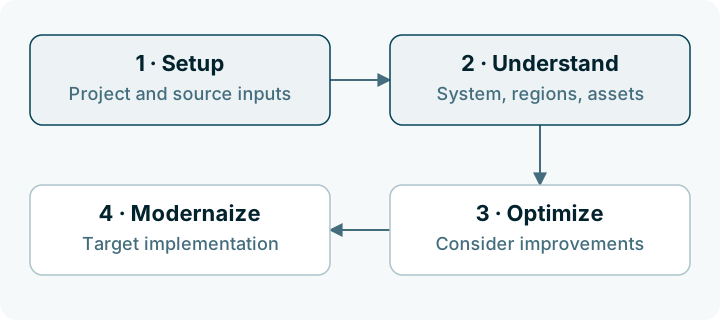
These guides concentrate on Setup and Understand. Setup establishes the project and its inputs. Understand provides the analysis used to investigate the existing system. The later phases place that understanding in the context of improvements and a target implementation.
The concepts that matter first
| Concept | Meaning |
|---|---|
| Project | The working context for a source platform and the artifacts you want to analyze |
| Source artifact | A supplied script, export, definition, or extraction package |
| Asset | An object represented in the analysis, such as a transformation, entity, source, or metric |
| Relationship | A connection between represented objects, such as a data dependency |
| Region | A group of related assets explored in Landscape |
| Briefing | The system-level summary in Understand |
| Landscape | The view of regions, effort, and dependencies |
| Detail | The view used to investigate individual assets |
Read Fundamental concepts for the relationships between files, assets, regions, and the evidence available in an analysis.
What you work with
- Setup shows the project context and supplied files.
- Briefing L0 introduces the system, its composition, and its assessment.
- Landscape L1 offers Heat, Coupling, Layers, and Clusters views.
- Detail L2 provides the asset inventory and individual asset investigation.
The levels organize the same investigation. You can return from an asset to the system summary without beginning a new analysis.
Start with an existing analysis
If your workspace already contains an analyzed project, begin with L0 briefing. Choose one important output or transformation, then use Landscape to examine the surrounding dependencies.
The guides use a synthetic monthly-revenue example to explain those decisions. Its orders, exchange rates, and reporting outputs are teaching examples, not a sample installed in your workspace.
Choose your next task
| Goal | Guide |
|---|---|
| Learn how files, assets, and regions relate | Fundamental concepts |
| Prepare source material for a project | Setup guide |
| Choose the inputs for your source technology | Supported source platforms |
| Explore an existing analysis | Understand guide |
| Explain an effort or confidence figure | Interpret analysis indicators |